Multiroom audio with OwnTone + shairport-sync


Notes on a DIY whole-home audio setup built with Ansible, Raspberry Pis and AirPlay 2. Written up in case it’s useful to anyone building something similar.
The shape of it
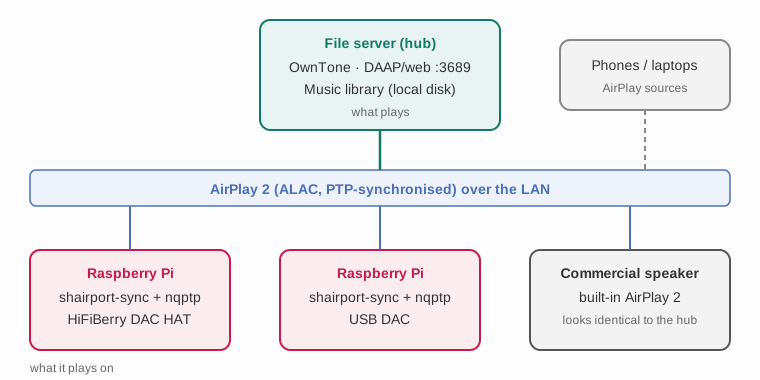
The design separates what plays from what it plays on.
OwnTone (formerly forked-daapd) is the hub: it owns the music library, exposes a DAAP/web interface on port 3689, and pushes audio out over AirPlay 2 to named endpoints.
shairport-sync is the other half. It turns a cheap Linux box into an AirPlay 2 receiver, so a Raspberry Pi with a decent DAC becomes a speaker that both OwnTone and any phone on the network can target.
The useful consequence: because the receiver layer is a standard protocol, DIY Raspberry Pi endpoints and off-the-shelf commercial AirPlay speakers appear identically in the same output list. You can mix and match, and add a £60 Pi next to a commercial speaker without the hub caring which is which.
The receivers: build from source, not packages
Debian Raspberry Pis handle the DIY end — one with a HiFiBerry DAC HAT, others with USB DACs. These are provisioned by an Ansible role, and the notable thing is that it builds from source rather than installing packages.
That isn’t gratuitous. AirPlay 2 support needs:
- nqptp — a PTP timing daemon, required
for AirPlay 2’s clock synchronisation. It also needs
setcapto access the system clock. - alac — Apple’s Lossless codec.
Neither ships in Debian repos. So the role clones all three of Mike Brady’s
repositories, runs the full autoreconf / configure / make / make install
chain, and does a make distclean afterwards to keep the boxes tidy.
Two Ansible details that made this maintainable:
- The build steps are handlers, not tasks — they only fire when the
gittask reports a change. A normal run doesn’t recompile anything, so the playbook stays fast and idempotent. - Per-host hardware differences are abstracted to two variables —
the ALSA card name and the sample rate (48 kHz throughout). Everything else is
identical across receivers. The card name is the only thing that really varies
(e.g.
sndrpihifiberryfor a HiFiBerry HAT).
Gotcha: the onboard audio steals card 0
On a Pi, the built-in audio device will happily claim ALSA card 0 ahead of your
DAC, and then shairport-sync plays out of the wrong device. The fix is a
/etc/modprobe.d/ blacklist for the onboard module, plus an explicit
/etc/asound.conf pinning the right card:
defaults.pcm.!card <your-card-name>
defaults.pcm.!device 0
defaults.ctl.!card <your-card-name>
defaults.pcm.dmix.rate 48000
The hub: one lesson learned the hard way
Originally the hub ran on one of the Raspberry Pis, which was both hub and receiver. It has since moved to a dedicated always-on file server, and that split is the single biggest improvement — the hub now sits next to the music library rather than reaching across the network for it, and a receiver going away no longer takes the library with it.
Two things worth knowing if you run OwnTone on a server:
-
Build from ports/source with lean options if your packaging offers them. The prebuilt binary packages tend to enable every feature, including Chromecast support, which pulls in WebRTC and X11 dependencies. On a headless server that’s a lot of unwanted surface area.
-
Pin each AirPlay endpoint with
permanentandreconnect. OwnTone keys outputs on the exact mDNS name the speaker advertises:airplay "Speaker Name" { permanent = true reconnect = true }Without these, speakers silently vanish from the list on an mDNS dropout and playback stops mid-album. With them, they stay listed and re-attach by themselves. This fixed the most common day-to-day annoyance.
Two honest limitations
- There is no true fixed-volume option. I wanted one endpoint (a speaker in a
spot where nobody should be adjusting it) pinned at full volume and
non-adjustable. OwnTone’s
max_volumeonly caps the ceiling — the output still scales with the master slider, and any client can still change it. A real lock would need something watching the API at runtime, which wasn’t worth it. - AirPlay 2 and commercial speaker controls can conflict. At one point
--with-airplay-2had to be dropped from OwnTone’s configure flags to get physical controls on a commercial speaker working again. Worth testing your specific hardware combination rather than assuming.
Would I do it this way again?
Yes, with one change: put the hub on the machine holding the library from day one. Everything else — AirPlay 2 as the common protocol, source builds driven by Ansible handlers, two variables per receiver — has held up well over several years, including a full relocation of the hardware, and mixing DIY and commercial speakers in one system genuinely works.
Scale, for context: a library of tens of thousands of tracks across a handful of simultaneous synchronised outputs, all negotiating ALAC, with no sync issues in normal use.